
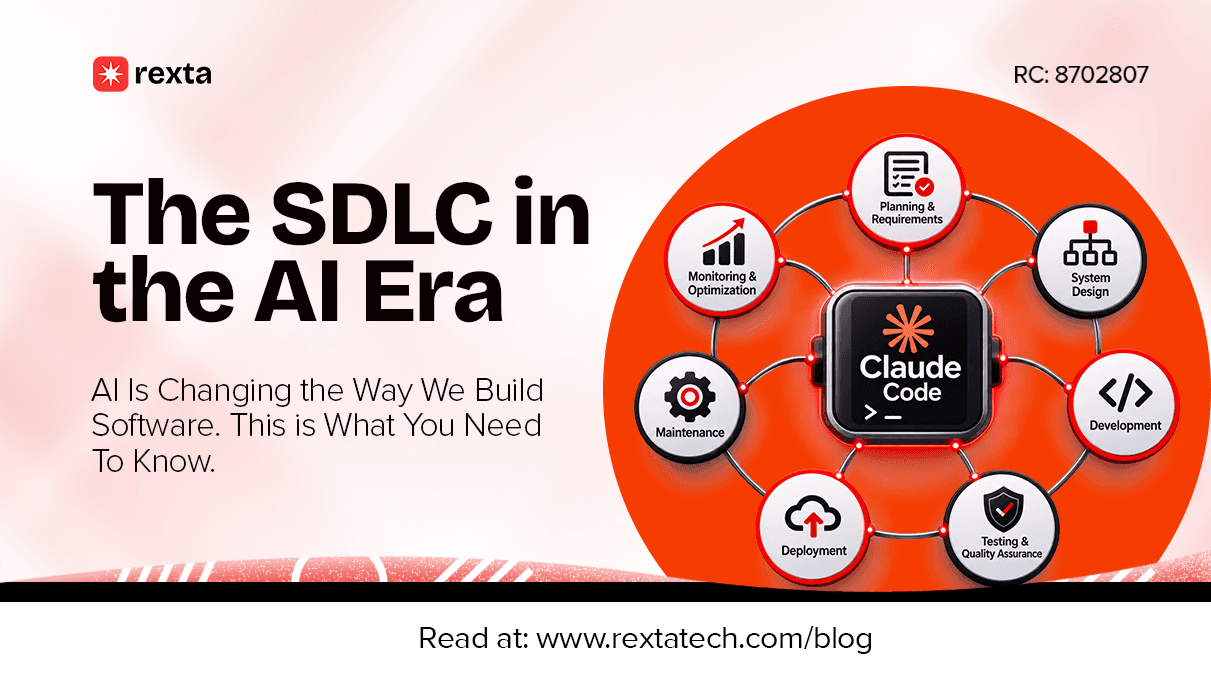
The SDLC in the AI Era: How AI Is Changing the Way We Build Software
AI has come to stay for the good. Software development is changing. Not because the fundamentals of building software have suddenly become obsolete, but because developer productivity tools are becoming considerably more capable.
A developer can now use AI to explain an unfamiliar codebase, generate a first draft of a function, write test cases, investigate errors, and even delegate connected tasks to coding agents. Work that once required hours of manual effort can sometimes be completed in minutes.
That sounds like an obvious win. But there's a question worth asking: Does being able to build software faster mean we're building better software?
A business owner commissioning an application might see AI as a way to reduce development time and cost. A developer might see it as a way to get through repetitive tasks and spend more time solving difficult problems. A software team might see an opportunity to rethink how projects move from an idea to a working product.
All three perspectives matter. But none tells the whole story.
Software has to do more than run. It has to solve the right problem, work reliably, protect the people using it, and remain maintainable after launch. Those responsibilities haven't disappeared because AI can generate code.
To understand what's changing, we need to look at the process itself: the Software Development Life Cycle, the stages involved, and where AI is beginning to make a meaningful difference.
1. Before We Talk About AI, What Exactly Is the SDLC?
Imagine a business owner approaches a development team with an idea.
They want to build a platform that connects customers with service providers. They have a rough picture of what it should do, perhaps a few features in mind, and an expectation of when it should be ready.
The temptation is to start designing screens and writing code immediately. But a competent development team has more work to do before the first line of code is written.
What problem is the platform solving? Who will use it? What should the first version do? What happens when two users try to book the same service? How will payments work? What information needs to be protected?
These questions are part of software development, too.
The Software Development Life Cycle (SDLC) is the structured process used to take software from an initial idea through planning, design, development, testing, deployment, and ongoing maintenance.
It provides a framework for making decisions, managing complexity, identifying risks, and ensuring that what gets built actually serves its intended purpose.
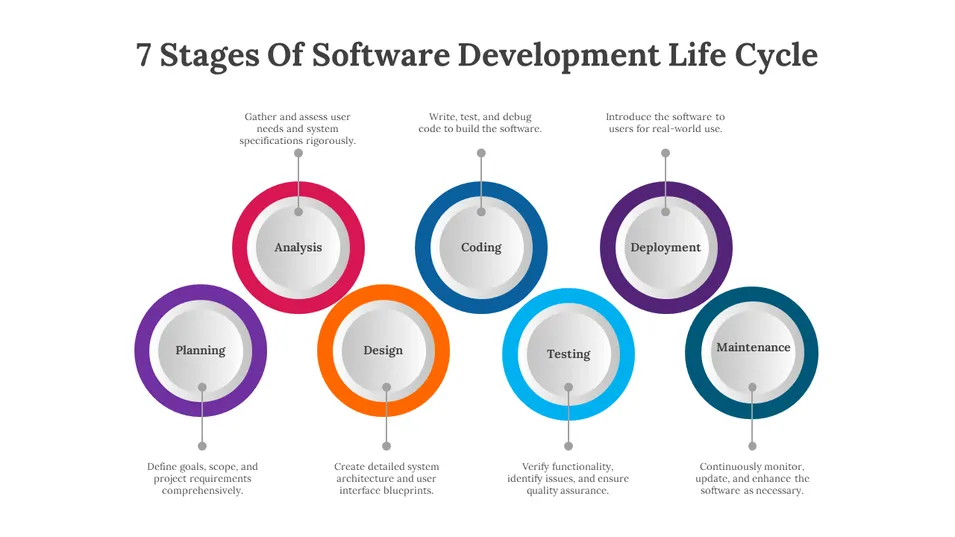
Source: Slide Egg
The SDLC is commonly explained through seven stages, highlighted below:
1.1 Planning and Requirements Gathering
This is where the team establishes what needs to be built and why.
Developers, business analysts, product managers, and other stakeholders work to understand the problem, identify the intended users, define the project scope, and establish what the software must accomplish.
The output should be a clear understanding of the product's requirements, constraints, and objectives.
1.2 Analysis
The team examines those requirements more closely.
Can the proposed solution actually work? What resources will it require? Are there technical limitations? What are the potential risks? Are there dependencies that need to be considered?
This stage helps establish the feasibility of the project and exposes problems before they become expensive to fix.
1.3 System Design
With a clearer understanding of the requirements, the team decides how the software should be structured.
This includes the system architecture, database design, user interfaces, integrations, security considerations, and how different components will communicate.
It is where the team moves from understanding what needs to be built to deciding how it should be built.
1.4 Development
This is where the design becomes working software.
Developers write code, implement features, connect components, configure databases, build APIs, and integrate external services.
The quality of the work depends on more than whether the code runs. It also depends on how well it is structured, how securely it handles information, and how easily it can be maintained.
1.5 Testing and Quality Assurance
Before software reaches its users, it needs to be tested.
The team checks whether features behave as expected, identifies defects, examines performance, tests security, and verifies that different parts of the system work together.
The objective is not simply to find out whether the application opens. It is to establish whether it can reliably do what it was designed to do.
1.6 Deployment
Once the software has passed the necessary checks, it is prepared for release.
This may involve configuring production servers, setting up databases, preparing environments, running migrations, configuring domains, and making the application accessible to its intended users.
Deployment is not just uploading files. It requires care because mistakes at this stage can affect real users and business operations.
1.7 Maintenance
Software development does not end when an application goes live.
Users discover problems. Businesses change their processes. Security vulnerabilities emerge. Operating systems, dependencies, and third-party services receive updates.
The development team must monitor the software, fix defects, improve performance, and introduce changes as requirements evolve.
These stages provide a useful structure, but they are not necessarily seven isolated activities completed once and never revisited. In iterative approaches such as Agile, teams continuously revisit requirements, design, development, and testing as they learn more about the product.
That distinction matters because AI is not replacing seven steps in a fixed assembly line. It is changing the work that happens within them, how quickly some tasks can be completed, and how teams coordinate the entire process.
2. AI Has Entered the Development Process. What Actually Changed?
AI in software development is not entirely new. Developers have used intelligent code completion, automated testing, static analysis, and other forms of automation for years.
What has changed significantly is the capability and accessibility of generative AI.
Developers can now describe a task in natural language and receive suggested code. They can ask an AI assistant to explain an unfamiliar function, generate database queries, draft documentation, or investigate an error message. More advanced coding agents can inspect files, make changes across a codebase, run commands, and attempt to complete multi-step tasks.
In other words, AI is moving beyond suggesting the next line of code. It is increasingly participating in larger portions of the development workflow.
And developers are adopting it.
According to Stack Overflow's 2025 Developer Survey, 84% of respondents were using or planning to use AI tools in their development process, compared with 76% in 2024. The survey also found that 51% of professional developers used AI tools daily. That is a significant shift in how software professionals work.
But adoption alone does not tell us whether the tools are improving the quality of the work.
The same survey found that 46% of respondents actively distrusted the accuracy of AI tool outputs, compared with 33% who trusted them. It also found that 66% were frustrated by AI solutions that were almost right but not quite.
Think about what that means in practice.
A developer asks an AI assistant to generate a function. The output looks reasonable. It may even work with the example provided. But it misses an edge case, makes an incorrect assumption about the database, or introduces a dependency that conflicts with the existing application.
The developer now has to investigate, correct, test, and integrate the result.
AI may have reduced the time spent producing the initial code, but it has not removed the work required to make that code dependable.
This is why the more useful question is not simply how much code AI can generate. It is how effectively a development team can use AI throughout the process without compromising the product.
AI Assistance Vs AI Agents
It is also worth distinguishing between two ways AI is being used.
AI-assisted development generally involves a developer working with an AI tool. The developer asks questions, requests code suggestions, generates tests, or uses AI to investigate problems while remaining directly involved in the work.
Agentic development goes a step further. An AI agent can be given a defined objective and allowed to carry out a sequence of tasks, such as inspecting a codebase, editing files, running tests, and reporting the outcome.
The distinction is important. Asking an assistant to write a function is different from asking an agent to implement a feature across several parts of an application.
Neither approach removes the need for clear instructions, technical oversight, or verification. In fact, the more responsibility delegated to an agent, the more important it becomes to establish boundaries around what it can access, change, and execute.
With that context, let's examine what AI is actually changing at each stage of the SDLC.
3. The SDLC, Stage by Stage: Where AI Is Making a Difference
It is easy to say that AI is changing software development. It is more useful to examine exactly where that change is happening.
Consider the example of a platform connecting customers with service providers. The team still needs to understand the business, define the requirements, design the system, build the application, test it, launch it, and maintain it.
What changes is the work involved in getting from one stage to another.
3.1 Planning and Requirements Gathering: From Ideas to Clear Requirements
Every software project starts with a problem, even when the person commissioning it arrives with a list of features instead.
A business owner might say, "I want an application where customers can book appointments, make payments, and review service providers."
That sounds like a reasonable starting point. But it raises several questions.
Can customers book without creating an account? Can a service provider reject a booking? What happens if two customers select the same appointment slot? Are payments made before or after a service? Can a customer cancel and receive a refund? Who resolves disputes?
These details shape the product. If they are overlooked during planning, they can become expensive problems during development.
AI can help teams work through this stage by turning rough ideas into more structured requirements. A developer or product manager can use it to:
Organize meeting notes and stakeholder conversations.
Draft functional and non-functional requirements.
Generate user stories and acceptance criteria.
Identify missing information and potential edge cases.
Explore possible workflows and user journeys.
Prepare initial project documentation.
For example, a team could describe the appointment-booking idea to an AI assistant and ask it to identify the questions that need answering before development begins.
It might highlight appointment conflicts, payment confirmation, cancellation policies, notification failures, and access permissions.
That is useful because it gives the team more things to investigate. It does not mean the AI has understood the business or made the decisions on its behalf.
There is a difference between identifying a possible requirement and confirming that the requirement reflects how a business actually operates.
A model might suggest that customers should pay before booking. But perhaps the business wants customers to pay after a service has been completed. The difference affects the payment workflow, database structure, refunds, and even how revenue is recorded.
The business must clarify what it needs. The development team must translate that understanding into requirements the system can implement.
AI can help organize the conversation, but it cannot replace the conversation itself.
3.2 System Design: Thinking Through How Everything Fits Together
Once the requirements are understood, the next question is how to build the system.
This is where architecture and technical design become important.
The team needs to decide how the application will be structured, how information will be stored, how different components will communicate, and what technologies are appropriate for the project's requirements.
For our booking platform, the design process might involve:
Deciding how customer and service-provider accounts will work.
Designing the database and its relationships.
Defining how appointment availability will be managed.
Planning payment gateway integration.
Establishing user roles and permissions.
Deciding how notifications will be delivered.
Considering security, performance, and future expansion.
AI can assist with several of these activities.
A developer can ask it to propose a database schema, compare architectural approaches, explain the implications of using a particular technology, or generate an initial system diagram.
It can also help produce interface wireframes, explore alternative user journeys, and document how different parts of an application are expected to interact.
But generating a database schema is not the same as designing a database that will serve a real business reliably.
An AI tool might produce tables for customers, providers, appointments, and payments. The initial structure may look reasonable. However, the team still needs to consider transaction integrity, duplicate bookings, concurrent requests, data access, payment reconciliation, and what happens when an operation fails halfway through.
These are not minor details. They are the kinds of decisions that determine whether a system remains dependable when actual people start using it.
The same applies to choosing an architecture. A tool can suggest microservices because they are popular or recommend a particular framework because it fits the prompt. That does not make the recommendation appropriate for the project.
A small business application may not need the complexity of a distributed architecture. An application expected to handle sensitive transactions may require stronger controls than a basic prototype.
Good system design is not about choosing the most fashionable technology. It is about making technical decisions that serve the product's actual requirements.
3.3 Development: Writing Code Is No Longer the Whole Story
This is where AI's influence is perhaps easiest to see.
Developers can now use AI assistants to generate code, explain unfamiliar functions, suggest implementations, refactor existing code, and identify possible errors.
Instead of manually searching through documentation for every unfamiliar concept, a developer can ask an assistant to explain how something works within a particular context.
AI can also help with repetitive tasks, such as generating boilerplate code, preparing data models, writing API endpoints, creating validation rules, and drafting documentation.
Coding agents introduce another layer. Depending on their capabilities and permissions, they can inspect a repository, modify multiple files, execute commands, and attempt to implement a feature from a defined task.
Imagine the team building the booking platform needs to introduce a provider availability feature.
An AI coding assistant could help draft the availability model, generate parts of the API, suggest validation logic, and write initial tests. An agent might be able to work across the relevant files and attempt to implement the feature.
That can reduce the amount of repetitive work developers have to do.
But there is a catch: Code that looks correct is not necessarily code that is correct.
A generated function might work with the example in the prompt but fail when two customers attempt to book the same time slot. An authentication implementation might appear functional while leaving an endpoint insufficiently protected. A suggested database query might return the expected result in a small test but perform poorly with a much larger dataset.
The developer still needs to understand the code, check its assumptions, review its dependencies, and ensure that it fits the existing architecture.
This is particularly important in backend development, where the most consequential problems are not always visible on the screen.
A booking page can look perfect while the underlying system incorrectly handles availability. A payment button can appear to work while the application fails to verify whether a transaction was actually successful.
AI makes it easier to generate implementations. Engineering expertise is still needed to determine whether those implementations are suitable.
3.4 Testing and Quality Assurance: Can We Trust What AI Builds?
Testing is one of the most important parts of software development, and AI is making it easier to automate some of the work involved.
Developers can use AI to generate unit tests, suggest integration test scenarios, create sample data, explain failing test results, and identify potential edge cases.
For our booking platform, AI could suggest tests for:
Booking an available appointment.
Attempting to book an unavailable appointment.
Cancelling an existing booking.
Handling failed payments.
Preventing unauthorized access to another user's booking.
Sending notifications after a successful reservation.
Preventing duplicate bookings.
It can also help investigate errors when a test fails.
However, there is a problem worth understanding: AI can generate tests that reflect the same incorrect assumptions as the code being tested.
Suppose a developer mistakenly implements a booking rule that allows two customers to reserve the same time slot. If the AI generates tests based on that flawed implementation, those tests may confirm the wrong behavior rather than expose it.
The team needs to understand what the system is supposed to do before deciding whether the test results are meaningful.
Testing should also go beyond whether individual functions return the expected values.
A proper quality assurance process may involve:
Unit testing: Checking individual functions and components.
Integration testing: Verifying that different parts of the system work together.
System testing: Evaluating the application as a complete product.
End-to-end testing: Testing realistic user journeys from beginning to completion.
Performance testing: Examining how the system behaves under different workloads.
Security testing: Looking for vulnerabilities and weaknesses.
User acceptance testing: Confirming that the product meets the needs of its intended users.
AI can support many of these activities, but the responsibility for deciding what needs to be tested and validating the results remains with the team.
There is also a wider security concern. Generated code should not be treated as safe simply because it came from a popular AI tool. It needs the same scrutiny as code written by a developer.
The National Institute of Standards and Technology (NIST) provides a useful reference here. Its Secure Software Development Framework (SSDF) outlines practices for reducing vulnerabilities throughout the software development process.
The lesson is straightforward: testing is not a formality that AI can conveniently complete for us. It is how we establish confidence in the software we intend to release.
3.5 Deployment: Getting Software Into the Hands of Users
After development and testing, the software has to be prepared for production.
This stage involves more than making an application available online.
The team may need to configure servers, prepare databases, manage environment variables, set up domains and SSL certificates, configure continuous integration and deployment pipelines, and ensure that the production environment is ready.
AI can assist with deployment documentation, configuration reviews, infrastructure scripts, troubleshooting, and parts of the CI/CD workflow.
It can help developers understand deployment errors and suggest ways to resolve them.
However, production deployment carries consequences that a development or testing environment does not.
A poorly configured release can expose sensitive information, interrupt business operations, cause data loss, or make an application unavailable to customers.
A deployment script generated by AI might work perfectly in a local environment but behave differently in production because of differences in permissions, environment variables, dependencies, or infrastructure.
This is why deployment decisions should be governed by established release procedures.
Teams need to verify configurations, protect credentials, review changes, maintain backups, and have a recovery plan if something goes wrong.
The objective is not to let AI deploy software as quickly as possible. It is to use automation and AI assistance to make releases more consistent without losing control of the process.
3.6 Maintenance: The Work Doesn't End at Launch
A business application might be launched today, but the environment it operates in will not remain the same.
Customers will use it in unexpected ways. Business requirements will change. Dependencies will receive updates. New vulnerabilities may be discovered. Traffic may increase. An integration that worked perfectly last month may suddenly stop responding.
This is why maintenance is a permanent part of the SDLC.
AI can help developers investigate error logs, identify patterns in reported problems, understand unfamiliar sections of a codebase, suggest fixes, and prepare documentation.
It can also assist with dependency updates, performance investigations, and routine maintenance tasks.
For example, if customers begin reporting that booking confirmations are arriving late, AI might help the team inspect relevant logs and identify possible causes.
But identifying a possible cause is not the same as confirming it.
The team must investigate the actual system, establish what is happening, verify the diagnosis, implement a fix, and test that the correction does not introduce another problem.
Maintenance also involves decisions about what should be improved, what should be replaced, and what should remain unchanged.
AI can make some of the investigation easier. It does not remove the need to understand the system being maintained.
Have a Software Idea or a Process That Needs Fixing?
Building useful software starts with understanding the problem, the people experiencing it, and what the solution needs to accomplish. At Rexta Technologies, we develop custom software, web applications, business management systems, and digital products around the way businesses actually work.
4. What AI Still Cannot Take Off the Developer's Hands
By now, it should be clear that AI can contribute to almost every stage of the SDLC. But contribution and responsibility are two different things.
A tool can generate a database schema. Someone still needs to decide whether that schema is appropriate.
An AI assistant can suggest an authentication implementation. Someone must verify that it protects the application properly.
An agent can modify files and run tests. Someone must determine whether the changes are correct and whether the tests cover the actual requirements.
This distinction becomes even more important when software handles money, personal information, business records, or critical operations.
Here are some responsibilities that still require meaningful human involvement.
Understanding the Real Problem
A client may request an application with twenty features. But perhaps the underlying problem can be solved with five well-designed features and a simpler workflow.
A developer who understands the business can challenge assumptions, ask better questions, and recommend a more suitable solution.
AI can help explore possibilities, but it does not automatically know which trade-offs make sense for that particular business.
Making Architectural Decisions
Architecture affects how software behaves as it grows.
Decisions about data structures, integrations, authentication, application boundaries, and infrastructure can have long-term consequences.
AI can provide recommendations, but someone needs to understand the context and evaluate the implications.
Protecting Users and Their Information
Security is not something to add after an application has been built.
Developers must consider how information is stored, who can access it, how authentication works, how permissions are enforced, and how the application responds to attacks.
NIST's Secure Software Development Framework reinforces the need to integrate security practices into the software development process rather than treat them as a final checkpoint.
Taking Responsibility for Quality
If a software product fails, the business cannot simply tell its customers that an AI tool generated the problematic code.
The development team must take responsibility for the software it delivers.
That means reviewing implementations, validating functionality, testing critical workflows, documenting important decisions, and maintaining the system after release.
Making Decisions When Requirements Conflict
Real projects involve trade-offs.
A business may want a feature delivered quickly, but the feature may introduce security concerns. A proposed architecture may offer flexibility but cost more to maintain. A design may look impressive but make the application difficult to use.
These decisions require context, experience, and judgment.
AI can help explain the options. It cannot take responsibility for choosing the right one.
5. The New Challenges of Building Software With AI
AI introduces opportunities, but it also introduces problems that development teams need to manage.
The biggest mistake would be to assume that because AI makes it easier to produce code, it automatically makes software projects easier to deliver.
Let's look at some of the challenges.
5.1 Code That Works Today but Creates Problems Tomorrow
AI can generate code that solves an immediate problem without necessarily considering the long-term structure of the application.
A quick implementation might introduce duplicated logic, unnecessary dependencies, inconsistent patterns, or tightly coupled components.
These decisions can make future changes more difficult.
This is one way technical debt accumulates: a team keeps accepting shortcuts that make the current task easier but increase the cost of maintaining the product later.
The answer is not to avoid AI-generated code. It is to review it with the same engineering standards applied to other code.
5.2 Security Risks and Data Exposure
Developers sometimes share code snippets, logs, configuration files, or error messages with AI tools to get assistance.
That can create problems if the material contains API keys, passwords, personal information, proprietary business logic, or other sensitive data.
There is also the risk of generated code introducing insecure practices.
A developer must consider what information can be shared with a tool, what permissions an AI agent receives, and how its outputs are reviewed before they enter a production codebase.
NIST's Secure Software Development Practices for Generative AI is relevant to security considerations as organizations begin integrating generative AI into software development workflows.
5.3 Overreliance on AI
AI is useful, but relying on it without understanding its output can create a dangerous knowledge gap.
A developer might accept a generated solution because it looks convincing, even when they cannot explain how it works or what its consequences might be.
This is especially concerning when working on complex backend logic, authentication, payments, and data handling.
The ability to generate code should not replace the ability to reason about code.
5.4 Faster Development, More Review Work
This is an interesting tension.
AI can increase the amount of code a developer produces. But every additional change still needs to be understood, reviewed, tested, and integrated.
If a team starts submitting larger changes simply because AI can generate them quickly, the review process can become more difficult.
Google's DORA research has repeatedly emphasized that software delivery depends on the broader engineering system, not just individual productivity. Its 2025 research describes AI as an amplifier of an organization's existing strengths and weaknesses.
A team with clear requirements, good documentation, reliable testing, and effective review practices may benefit substantially from AI. A team already struggling with unclear ownership and inconsistent processes may simply produce more work that is difficult to manage.
5.5 The Illusion of Productivity
One of the most interesting findings in AI development research challenges the assumption that using AI always makes developers faster.
In July 2025, METR published a randomized controlled trial involving 16 experienced open-source developers completing 246 real tasks in codebases they already knew well.
The researchers found that developers took 19% longer when allowed to use the AI tools available during the study, even though the participants had expected the tools to make them faster.
This result needs context. The study involved a relatively small group of experienced developers working on mature repositories, using tools available at that time. It should not be treated as proof that AI makes every developer slower.
But it highlights something important: perceived productivity and measured productivity are not always the same.
Sometimes AI saves time. Sometimes reviewing and correcting its output takes longer than completing the task manually.
The practical lesson is to measure what actually improves delivery rather than assume that adopting more AI tools automatically produces better results.
6. Has AI Changed the SDLC, or Just the Way We Work Within It?
This is where the different parts of the discussion come together.
The traditional stages of the SDLC still exist. Software still needs to be planned, designed, developed, tested, deployed, and maintained.
What is changing is how teams perform the work within those stages.
Planning can involve AI-assisted requirement analysis. Design can involve AI-generated prototypes and architecture suggestions. Development can involve coding assistants and agents. Testing can involve automatically generated test cases. Maintenance can involve AI-assisted log analysis and debugging.
The process is becoming more assisted, more automated in certain areas, and increasingly iterative.
But that does not mean every development team should abandon its existing workflow and hand the entire process to AI.
Consider the findings from the 2025 Stack Overflow Developer Survey again. While AI adoption is widespread, developers still report concerns about accuracy, complex tasks, and the difficulty of correcting outputs that are almost right.
That tells us something about the direction of change.
The value of AI is not simply that it can perform tasks. Its value depends on whether those tasks are appropriate to delegate, whether the outputs are reliable, and whether the team can integrate them into a sound development process.
In some situations, AI will make a stage significantly faster. In others, it may provide useful assistance without changing the overall timeline much. And for certain high-risk decisions, human review will remain essential.
So, has AI changed the SDLC?
It has changed the way we work within it, and it is beginning to change how some teams organize and execute the process. But the fundamental responsibilities of software engineering remain.
7. What This Means for Businesses Planning to Build Software
You do not have to be a developer to understand why these changes matter.
If you are planning to build a website, application, internal business system, or software product, you will likely encounter AI somewhere in the development process.
Your development team may use AI to write code, generate tests, investigate problems, or speed up documentation. That is not inherently a bad thing. Used responsibly, these tools can make parts of the process more efficient.
But there are a few things worth understanding before you commission a software project.
AI Does Not Automatically Make Your Project Cheap
A development team may complete some tasks faster with AI, but the total cost of a project depends on much more than typing code.
Requirements gathering, architecture, integrations, testing, security, deployment, and maintenance still require time and expertise.
A cheaper quote is not necessarily a better deal if it leaves out important work.
You Still Need to Know What Problem You Are Solving
AI can help a team explore features and workflows, but your business needs to provide the context.
What is currently difficult? What takes too much time? Where are mistakes happening? What should the new software improve?
The clearer the problem, the easier it becomes to make good decisions about the solution.
Ask How the Software Will Be Tested
Do not settle for being told that the application has been completed.
Ask how the team verifies that the features work, how it handles errors, what security checks are performed, and how it ensures that different parts of the application work together.
A working demonstration is useful, but it is not a substitute for a proper testing process.
Understand What Happens After Launch
Who will fix bugs? Who handles updates? What happens when the business needs another feature? Is documentation available? Who has access to the codebase and production environment?
These are important questions because software is not a one-time purchase that never needs attention again.
Look for Engineering Judgment, Not Just AI Tool Adoption
A development team should be able to explain why it chose a particular approach, how it manages risks, and how it knows the finished product meets the requirements.
The tools used to build your software matter, but the quality of the decisions made throughout the process matters more.
At Rexta Technologies, our approach to software development starts with understanding the problem a business needs to solve. We build custom systems around actual operations, workflows, and requirements rather than forcing businesses into solutions that do not fit. Learn more about our software development services.
8. The Future of Software Development Is Not Just About Writing Faster Codes
AI has changed the software development conversation.
Developers can generate code, explore technical ideas, automate repetitive tasks, and delegate certain activities to increasingly capable tools. Businesses are beginning to expect faster delivery, and development teams are rethinking how they work.
But the fundamentals have not changed. The technical baseline decisions remain.
A good software product still begins with understanding a real problem. It still requires thoughtful design, sound architecture, reliable implementation, proper testing, secure deployment, and ongoing maintenance.
The difference is that developers now have additional tools to help them perform some of that work.
And perhaps that is the most important point to take away from all this.
The goal of software development has never been to write the most code in the shortest amount of time. It is to build something that works, solves a problem, and continues to serve the people who depend on it.
AI can help us get there. But getting there still requires people who understand what they are building and why.
The future belongs neither to teams that ignore AI nor to teams that blindly hand everything over to it. It belongs to teams that know how to use it without losing sight of what good software engineering demands.
Frequently Asked Questions
What is the Software Development Life Cycle (SDLC)?
The Software Development Life Cycle (SDLC) is a structured process for planning, designing, developing, testing, deploying, and maintaining software. It helps development teams manage projects, control risks, and ensure that the finished product meets its intended requirements.
How is AI changing the Software Development Life Cycle?
AI is assisting with activities across the SDLC, including requirements gathering, system design, code generation, testing, deployment support, and maintenance. It can automate repetitive tasks, help developers investigate problems, and support certain multi-step workflows. However, human oversight remains important for technical decisions, quality assurance, and security.
Can AI automate the entire software development process?
AI can automate or assist with several development activities, and AI agents can execute connected tasks with limited direct intervention. However, fully automating the entire process reliably remains a different challenge. Understanding business requirements, validating architecture, managing risks, and taking responsibility for production software still require appropriate human involvement.
Can AI build a complete application without a developer?
AI tools can generate functional applications and prototypes from written instructions. However, a working prototype is not necessarily a production-ready application. Complex requirements, database integrity, security, integrations, testing, and maintenance require careful technical review.
How is AI used in software testing?
AI can help generate test cases, write unit tests, analyze test failures, identify possible defects, and suggest edge cases. It can also support automated testing workflows. However, test results must be evaluated against the actual requirements to ensure that the software behaves correctly.
Does AI make software development cheaper?
AI can reduce the time spent on certain tasks, potentially lowering development costs. However, the total cost still depends on project complexity, requirements, integrations, security, testing, infrastructure, and ongoing maintenance. AI adoption does not automatically make every software project cheaper.
Will AI replace software developers?
AI is changing the responsibilities and workflows of software developers, but software engineering involves much more than writing code. Understanding problems, designing systems, evaluating trade-offs, reviewing implementations, and ensuring reliability remain important responsibilities. Developers who learn to use AI effectively can incorporate it into their work while continuing to apply engineering judgment.
What are the risks of using AI in software development?
Common risks include inaccurate generated code, security vulnerabilities, data exposure, overreliance on AI outputs, insufficient testing, and technical debt. Development teams should review generated code, apply security practices, protect sensitive information, and validate results before releasing software.
Is the traditional SDLC still relevant in the AI era?
Yes. The fundamental stages of planning, design, development, testing, deployment, and maintenance remain relevant. AI changes how teams perform some activities within those stages, but it does not remove the need for a structured development process.
Planning to Build Software for Your Business?
AI is changing how software gets built, but choosing the right solution still starts with understanding your business. Tell us what you want to build, what needs to work better, or what problem you're trying to solve. We'll help you work out the technical direction and build a solution around it.
Research and External References
The following sources support the research and arguments in this article. They should be retained as relevant contextual links in the published article, rather than presented as a collection of unrelated links.
Stack Overflow Developer Survey 2025: AI adoption, trust, and usage. Supports the statistics on AI adoption, daily use, developer trust, and frustration with AI-generated results.
Google DORA, 2025 State of AI-assisted Software Development: Read the report. Examines AI adoption and its relationship with software delivery performance, organizational capabilities, and engineering practices.
METR, July 2025: Measuring the Impact of Early-2025 AI on Experienced Open-Source Developer Productivity. Source for the randomized controlled trial involving 16 experienced developers, 246 tasks, and the reported 19% slowdown.
NIST: Secure Software Development Framework. Provides guidance on integrating security practices throughout software development.
NIST: Secure Software Development Practices for Generative AI. Addresses secure software development considerations involving generative AI.
GitHub Research: Quantifying GitHub Copilot's impact on developer productivity and happiness. Provides an earlier controlled experiment reporting faster task completion with GitHub Copilot, offering a useful contrast to other productivity findings.
Atlassian: Minimum Viable Product. Useful background on product scope and iterative development.
Y Combinator: How to Plan an MVP. Offers practical guidance on defining and building an initial product.
Don't Be a Stranger.
Connect with us on our social media platforms to get yourself abreast of first hand updates, insights and useful contents we share around software engineering, AI and business automation.
Reactions
Stay in the loop
Get notified when we publish a new blog post. No spam, just insights and updates from the Rexta Technologies team.
Related Posts

ERP for Business Efficiency: What It Does and How to Choose the Right One
Discover how ERP systems connect business operations, reduce manual work, and improve efficiency. Learn what to look for when choosing between an off-the-shelf, customized, or bespoke ERP solution.
16 Nov 2026

Your MVP Should Embarrass You a Little: The Right Way to Scope Your Product
Learn what makes a minimum viable product, how to avoid scope creep, choose the right features for your first release, and use early user feedback to build a better product.
13 Nov 2026

7 Books to Read as a Business Owner Before You Launch
Explore seven useful business books covering customer research, innovation, sales, leadership, and the practical lessons every aspiring entrepreneur should know before launching.
11 Nov 2026

Business 101: 7 Things You Need to Understand Before Starting a Business
Discover seven business fundamentals covering brand identity, customer research, financial management, marketing, and the systems needed to build a business that can grow.
6 Nov 2026